
DIY Gingerbread Man Appliqué Sweatshirt With Cricut
It’s almost Christmas time! I can hardly believe that I’m typing those words, myself. If you’ve been here before, you know that I love a good handmade holiday project. This year, I decided to make a DIY sweatshirt with a fabric gingerbread man appliqué. Being a mom of little ones and teaching preschool, I always love wearing festive, fun things around the holidays to help get into the spirit. Last Christmas, I made a fun appliqué Christmas tree sweatshirt- you can find that tutorial HERE.
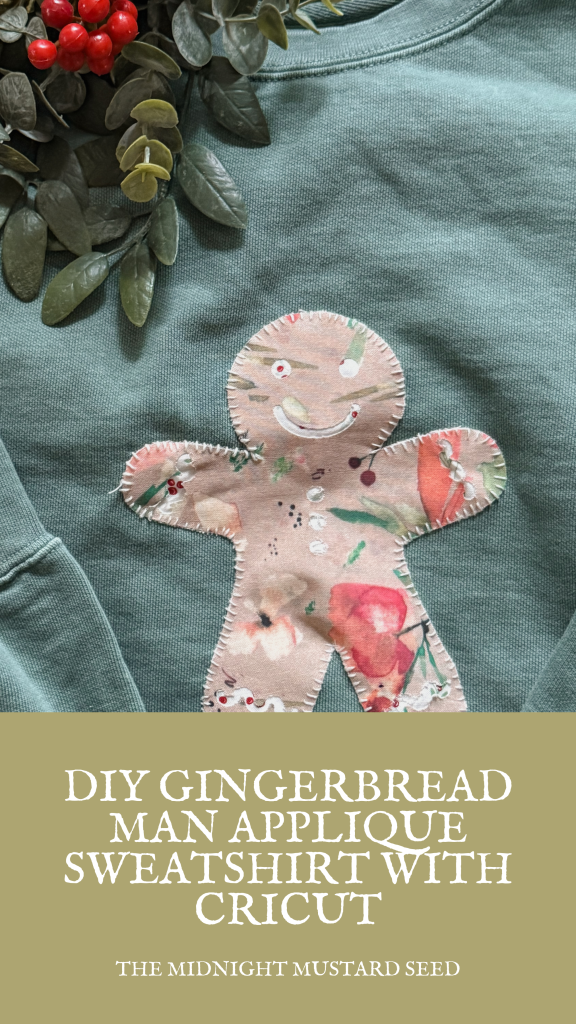
If you want to make your own adorable gingerbread shirt, just follow along with this super easy Cricut tutorial. Festive shirts not your thing? These appliqués can be turned into ready-made projects for a fun craft-centered gift or use Cricut design space to make your own adorable gingerbread man gift tags! Let’s get started!
What You’ll Need
• Blank sweatshirt ( I love Comfort Colors )
• Heat n Bond (my favorite iron on adhesive for fabric appliqués)
• Scraps of cotton fabric (brown for the gingerbread, white for icing, red/green for buttons & bow)
• Gingerbread Man SVG from Cricut Design Space
• Cricut Maker, Explore, or Joy (works with any model)
• Standard or Fine-Point Blade
• cutting mat
• Cricut EasyPress or household iron
• Embroidery floss + needle (optional but SO cute for the finishing touch and necessary for lasting quality )
Find the Perfect Gingerbread Man Silhouette in Cricut Design Space
Good news — you don’t have to leave Design Space or buy anything! Cricut Access has a ton of adorable gingerbread man images built right in (and most of them are free with your subscription, or just $0.99 if you’re not subscribed).
I made my gingerbread man about 7 inches tall for an adult sweatshirt (perfectly oversized and cozy), but you can shrink him down for kids’ shirts or even tiny gingerbread man gift tags if you want to get extra festive.
Step-by-Step: Let’s Make This Gingerbread Man Sweatshirt
1. Prep Your Fabric with HeatnBond
Iron HeatnBond to the wrong side of both (or all three) of your fabrics. Paper side up, medium-high heat, no steam. This turns your pretty cotton into “sticker fabric” that your Cricut can cut perfectly.
2. Cut the Gingerbread Man in Cricut Design Space
Choose the gingerbread man SVG .
Set material to “Bonded Cotton” and use medium pressure. I cut mine about 7 inches for an adult sweatshirt — you can resize to whatever fits your project (kids’ shirts, pillows, wall art, even gingerbread man gift tags!).
3. Layer & Fuse
Peel the paper backing off your top layer (the gingerbread body) and iron it onto your second fabric. Now trim around the shape so the bottom fabric peeks through the negative space for some fun pattern-mixing!
4. Attach to Your Sweatshirt
Peel the final paper backing, position your gingerbread man wherever your heart desires, and give it a good press with the iron. He is snow in place for stitching!
5. Stitch It Down
I used a simple blanket stitch with white quilting thread around the outer perimeter of my gingerbread man. If you’re short on time, a zigzag stitch on your sewing machine works great too. Trust me, stitching is non-negotiable if you want this to survive the washer and dryer a million times.
That’s it — the coziest, cutest gingerbread man shirt (or sweatshirt, or pillow, or tote) you ever did see! This same technique works for any appliqué design, so once you’ve got it down, the possibilities are endless. This project is perfect for last-minute Christmas crafting!
Happy making and Merry Christmas!
Blessings,
Samm
P.S. If you make one, tag me @themidnightmustardseed — I love seeing your projects!


